Home quick actions de iOS 13 en Xamarin.Forms

En esta ocasión os traigo un post en el que explico cómo añadir opciones a las acciones rápidas de una app iOS, tanto de manera estática como dinámica.
Para añadir una opción de menú hay que definir su icono, título, subtitulo y tipo.
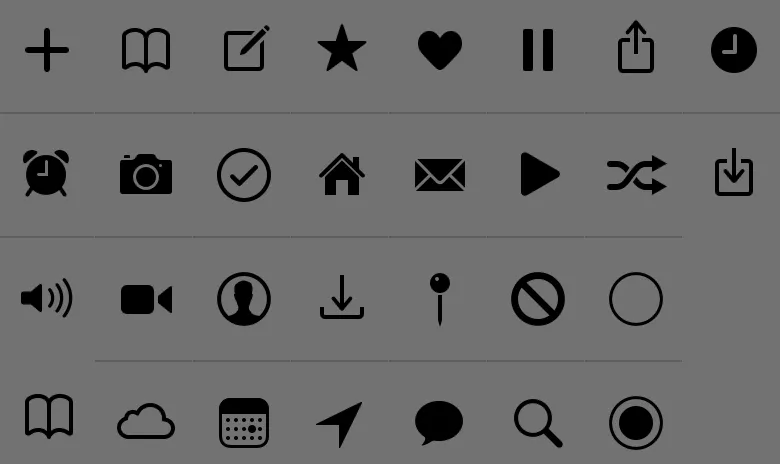
Los iconos están prefijado y estos son todos los valores que se le pueden dar:
- UIApplicationShortcutIconTypeAlarm
- UIApplicationShortcutIconTypeAlarm
- UIApplicationShortcutIconTypeAudio
- UIApplicationShortcutIconTypeBookmark
- UIApplicationShortcutIconTypeCapturePhoto
- UIApplicationShortcutIconTypeCaptureVideo
- UIApplicationShortcutIconTypeCloud
- UIApplicationShortcutIconTypeCompose
- UIApplicationShortcutIconTypeConfirmation
- UIApplicationShortcutIconTypeContact
- UIApplicationShortcutIconTypeDate
- UIApplicationShortcutIconTypeFavorite
- UIApplicationShortcutIconTypeHome
- UIApplicationShortcutIconTypeInvitation
- UIApplicationShortcutIconTypeLocation
- UIApplicationShortcutIconTypeLove
- UIApplicationShortcutIconTypeMail
- UIApplicationShortcutIconTypeMarkLocation
- UIApplicationShortcutIconTypeMessage
- UIApplicationShortcutIconTypePause
- UIApplicationShortcutIconTypePlay
- UIApplicationShortcutIconTypeProhibit
- UIApplicationShortcutIconTypeSearch
- UIApplicationShortcutIconTypeShare
- UIApplicationShortcutIconTypeShuffle
- UIApplicationShortcutIconTypeTask
- UIApplicationShortcutIconTypeTaskCompleted
- UIApplicationShortcutIconTypeTime
- UIApplicationShortcutIconTypeUpdate

 En la app de ejemplo que he desarrollado, hay 3 páginas y 3 opciones de menú, 2 añadidas de forma estática y 1 de forma dinámica. Cada una de las opciones, al pulsarse, abre la app navegando a la página correspondiente.
Para conseguir desarrollar esta app, lo primero que he hecho es crear un enumerado en el que definir cada uno de los tipos de opciones de menú.
public static class MenuActions
{
    public const string ShowPage1 = "com.companyname.iPhoneHomeQuickActions.Page1";
    public const string ShowPage2 = "com.companyname.iPhoneHomeQuickActions.Page2";
    public const string ShowPage3 = "com.companyname.iPhoneHomeQuickActions.Page3";
}
Lo siguiente es añadir las opciones de menú estáticas. Esto se consigue añadiéndolas en el archivo info.plist, tal y como se muestra a continuación.
<key>UIApplicationShortcutItems</key>
<array>
    <dict>
    <key>UIApplicationShortcutItemIconType</key>
    <string>UIApplicationShortcutIconTypeBookmark</string>
    <key>UIApplicationShortcutItemSubtitle</key>
    <string>Open Page 1</string>
    <key>UIApplicationShortcutItemTitle</key>
    <string>Page 1</string>
    <key>UIApplicationShortcutItemType</key>
    <string>com.companyname.iPhoneHomeQuickActions.Page1</string>
    </dict>
    <dict>
    <key>UIApplicationShortcutItemIconType</key>
    <string>UIApplicationShortcutIconTypeCompose</string>
    <key>UIApplicationShortcutItemSubtitle</key>
    <string>Open Page 2</string>
    <key>UIApplicationShortcutItemTitle</key>
    <string>Page 2</string>
    <key>UIApplicationShortcutItemType</key>
    <string>com.companyname.iPhoneHomeQuickActions.Page2</string>
    </dict>
</array>
Para añadir las opciones dinámicas, hay que hacerlo desde el AppDelegate, sobrescribiendo alguno de los métodos en los que el UIApplication llega como parámetro. En este ejemplo, he sobrescrito el FinishLaunching
public override bool FinishedLaunching(UIApplication app, NSDictionary options)
{
    global::Xamarin.Forms.Forms.Init();
    LoadApplication(new App());
    CreateDynamicShortcuts(app);

    return base.FinishedLaunching(app, options);
}

private void CreateDynamicShortcuts(UIApplication application)
{
    var dynamicShortcut = new UIMutableApplicationShortcutItem(MenuActions.ShowPage3, "Dynamic - Page 3")
    {
        LocalizedSubtitle = "Open Page 3",
        Icon = UIApplicationShortcutIcon.FromType(UIApplicationShortcutIconType.Play)
    };

    application.ShortcutItems = new UIApplicationShortcutItem[] { dynamicShortcut };
}
Lo único que faltaría es controlar cuando el usuario pulsa alguno de estos shortcuts. Para ello, es necesario sobrescribir el método PerfomActionForShortcutItem. En el ejemplo que he realizado, esta sobrescritura llama a un método en el App.cs de la librería común y, es ahí, donde se decide a qué página se navega.
public override void PerformActionForShortcutItem(UIApplication application, UIApplicationShortcutItem shortcutItem, UIOperationHandler completionHandler)
{
    completionHandler(HandleShortcutItem(shortcutItem));
}

private bool HandleShortcutItem(UIApplicationShortcutItem shortcutItem)
{
    if (shortcutItem == null)
        return false;

    return (App.Current as App).ManageMenuAction(shortcutItem.Type);
}
public bool ManageMenuAction(string action)
{
switch (action)
{
case MenuActions.ShowPage1:
(MainPage as NavigationPage).CurrentPage.Navigation.PushAsync(new Page1());
return true;
case MenuActions.ShowPage2:
(MainPage as NavigationPage).CurrentPage.Navigation.PushAsync(new Page2());
return true;
case MenuActions.ShowPage3:
(MainPage as NavigationPage).CurrentPage.Navigation.PushAsync(new Page3());
return true;
}
return false;
}Como es habitual, he creado un proyecto en GitHub para ofrecer más detalles de la implementación que he realizado. Espero que os sea de ayuda https://github.com/jorgediegocrespo/XamariniOSShortcuts